


Co–Star Personalized Astrology
4.516.04K Reviews
App Specs
- Version
- 1.2026.08.25.0
- Updated On
- License
- Free
- Downloads
- 5,000,000+
- Developer
- Co–Star Astrology Society
- Categories
- Lifestyle
- Platform
- Android, iOS
Screenshots

 Analysis by AppCompare
I tend to get more out of astrology when I treat it as a prompt for reflection rather than a forecast I have to obey. That distinction matters with Co–Star Personalized Astrology: its daily guidance is most useful when it helps me pause and consider a situation, not when I expect it to settle a decision for me. If you enjoy astrology but prefer to keep your own judgement in charge, that is a sensible way to approach it.
What the free access means in practice
Co–Star is a free lifestyle app from Co–Star Astrology Society, with optional in-app purchases priced from $0.99 to $74.99 per item. That makes it possible to try the app without paying upfront, while the range of optional purchase prices is worth noticing before you buy anything. I would start with the free experience and decide whether the app’s style is useful to you before considering an extra purchase; the price alone does not tell you what an individual item includes or whether it will suit your needs.
The app is rated for teens, and its current version is 1.2026.02.18.0, with iOS 8.0 as the minimum operating system requirement. It has a 4.6 average from around 95,000 ratings, about 16,000 written reviews, and over 5 million installs. Those figures suggest a widely used app, but they cannot predict whether its interpretive, sometimes pointed tone will click with you. Astrology is personal, and the value here depends more on how you respond to the writing than on popularity.
How to make the daily reading more useful
A practical way to use the app is to read the daily guidance after choosing one real question you are already thinking about: perhaps whether to raise a concern at work, how to handle a tense conversation, or what has been taking up your attention. I would jot down the line that feels relevant, then ask what concrete evidence in my day supports or challenges that interpretation. This turns a horoscope into a small reflection exercise and makes it less tempting to treat a broad reading as a guaranteed prediction.
There is also a useful distinction between a quick check and a deeper session. The day-at-a-glance summary suits a hurried morning, while the longer categories and reflective prompts make more sense when you have enough time to think. I would not try to absorb every section while rushing out the door; pick the part that matches your mood, and leave the rest for later if you want to return to it.
Using the social side with care
Friend charts and compatibility can be entertaining, but I would use them as conversation starters rather than explanations for another person’s behaviour. If a reading appears to describe a mismatch, it is healthier to ask your friend what they actually think than to assume a planetary placement explains a disagreement. The notes feature can make that exchange more playful, though it works best when both people enjoy this kind of language and understand that it is not a substitute for an honest conversation.
One small workflow that helps is to add only the friends you genuinely want to compare with, rather than turning the social feature into a roster of every contact. That keeps the experience more intentional and may also reduce the notification clutter noted below. If astrology is private for you, or your friends would rather not have their charts brought into conversations, you can simply focus on your own readings instead.
Worth Reading Before You Choose

Flipboard Shows What News Apps Must Do Beyond the Feed

Switching to Android Auto Means Rethinking Your Driving Routine

Google Calendar Makes a Crowded Week Easier to Manage

Ludo King Makes the Most of the Minutes Between Plans

Baby Panda World Brings Quick Play to Modern Phones, but Its Game Library Feels Busy

ESPN’s Live Game View Makes Following Close Games Easier
Where another kind of astrology app may suit you better
Compared with a basic horoscope app that offers a short sign-based forecast, Co–Star puts more emphasis on birth-chart personalization, day-to-day interpretation, and sharing readings with friends. That can feel richer if you want material to reflect on, but it is not automatically better for everyone. Someone who wants a quick, uncomplicated overview may prefer a simpler horoscope format; someone learning astrology in a systematic way may be better served by a reference-focused resource that explains chart concepts step by step. Co–Star’s appeal is its particular mix of personal readings and social conversation, not a promise to replace every other approach.
It is also worth keeping expectations grounded around personalization. Entering birth details gives the app a basis for tailoring its chart-based material, but a personalized reading can still feel broad or miss the mark. I would not use it as the deciding authority for health, money, work, or relationship choices. Its strongest role is as an optional lens for reflection, alongside your own experience and practical information.
Features that Shine Bright
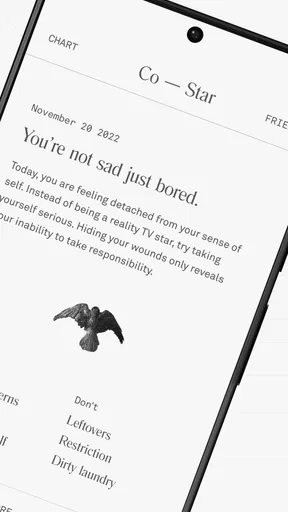
First off, let's talk about the interface. Co–Star has a sleek, minimalist design that’s easy on the eyes and super intuitive to navigate. I love how the app feels both modern and mystical, with a black-and-white theme that adds a touch of elegance.
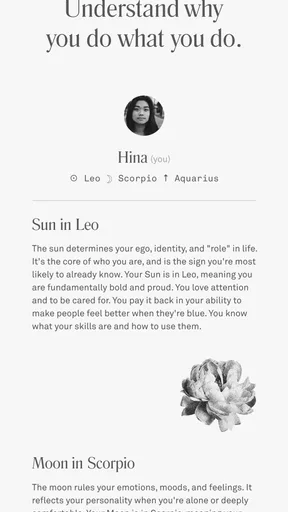
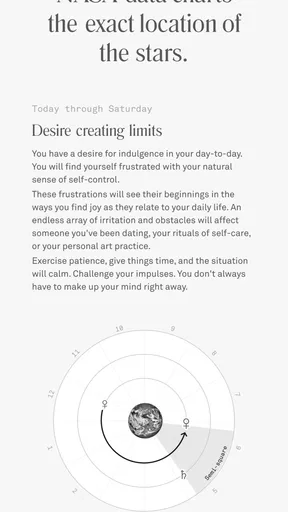
Upon signing up, I entered my birth details, and just like that, my personalized chart was ready. The app uses data from NASA to track planetary movements, so you know you’re getting the real deal. It’s like having your personal astrologer in your pocket! Each day, Co–Star provides little nuggets of wisdom tailored just for you. Whether it’s about relationships, work, or self-care, these insights are refreshingly spot-on.
The Social Cosmos
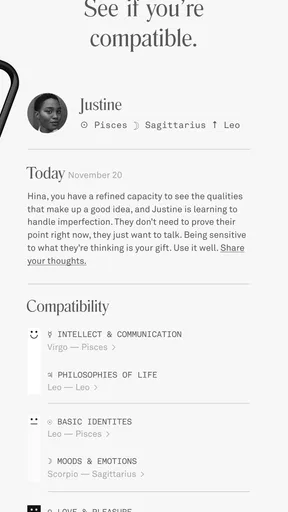
One of the coolest features is the social aspect. You can add friends to see their astrological charts and compatibility. It’s interesting to see how your planetary alignments sync up with your besties or even your partner. Who knew Mercury might be the reason for your last tiff?
Plus, the app has this nifty feature where you can send and receive notes with your friends. It’s a fun way to connect on a deeper level and maybe even bond over that crazy lunar eclipse.
Daily Horoscopes and More
What’s a good astrology app without daily horoscopes? Co–Star dishes out detailed horoscopes that cover various aspects of life. The app breaks it down into categories like "Pressure," "Trouble," and "Power," which helps you focus on what to embrace and what to avoid. And let me tell you, when my horoscope warned about potential "trouble" with communication, I definitely kept my emails a bit more concise that day!
There’s also a section called "Your Day at a Glance," which provides a quick summary of what’s in store. It’s perfect for those mornings when you’re rushing out the door but still want a celestial heads-up.
Insightful and Thought-Provoking
Another aspect I appreciate is the thought-provoking prompts the app offers. These aren’t your average horoscope lines. Co–Star challenges you to reflect on deep questions that align with planetary movements. These prompts have made me pause and think about my life and relationships in new ways.
For instance, one day’s prompt asked how I deal with conflict, which was interestingly aligned with a Mars transit in my chart. It’s like the app knows me better than I know myself!
Room for Improvement?
While the app is generally a joy to use, it could benefit from a couple of enhancements. For instance, sometimes the notifications can be a bit overwhelming, especially if you’ve added multiple friends. A more customizable notification setting would be a welcome addition.
Also, while the insights are usually spot-on, there are days where they feel a bit generic. But hey, no app is perfect, right? A little room for mystery keeps things exciting!
Final Thoughts
So, is Co–Star Personalized Astrology worth your time? Absolutely! Whether you’re a seasoned astrologer or just someone intrigued by the stars, this app offers a unique blend of personalized insights, social connectivity, and daily guidance that feels both mystical and modern. It’s like having a cosmic guide right in your pocket, ready to help you navigate life’s ups and downs.
With its sleek design, detailed horoscopes, and thought-provoking prompts, Co–Star is more than just an app; it’s a gateway to understanding yourself and the universe a little better. So, why not give it a whirl and see what the stars reveal for you today?
Who is likely to get the most from it?
I can see Co–Star working especially well for someone who already enjoys comparing interpretations, talking astrology with friends, or using short prompts as a journaling nudge. It gives that person a recurring reason to check in with their own reactions, and its social features can make astrology feel like a shared interest rather than a solitary daily reading. If you are new to astrology, the app can still be an approachable starting point, as long as you are comfortable with its confident, sometimes cryptic style and do not expect a step-by-step course.
By contrast, I would skip it if you want practical instructions, a neutral tone, or forecasts that explain exactly how they were derived in plain language. It may also frustrate readers who prefer broad, gentle encouragement: categories such as "Trouble" and "Pressure" can feel sharper than a reassuring daily message. If a challenging reading sticks in your mind or makes you anxious, there is no benefit in forcing yourself to check it every day. An astrology app should add perspective, not create another source of stress.
A realistic routine, without letting the reading run the day
Imagine opening the app before a meeting after a difficult exchange with a colleague. A line about communication might prompt you to notice that you are already feeling defensive. I would use that as a cue to prepare a clear question and listen carefully, not as proof that the meeting will go badly. Afterward, you could look back at the prompt and decide whether it helped you act more thoughtfully. That simple before-and-after check is a better test of personal usefulness than deciding whether a prediction was magically exact.
For a lower-effort habit, choose one prompt a day and write a sentence about it in a notes app or journal you already use. Over time, you can see which themes reliably lead to useful reflection and which ones feel generic to you. This is also a sensible way to avoid turning every notification into something you must interpret. If you prefer not to keep a separate journal, a quick mental check—“Does this connect to anything I am actually dealing with?”—is enough to accept or set aside the reading.
Notifications, expectations, and the limits of interpretation
The notification issue is more than a minor annoyance if you have several friends connected: frequent alerts can make a reflective app feel demanding. I would review which people and updates genuinely add value, then mute or reduce anything that interrupts your day where the available controls allow it. If the app’s alerts still feel like noise, checking it at a chosen time rather than reacting immediately can preserve the useful part without letting astrology dictate your attention.
Another trade-off is that vivid wording can make a general interpretation feel unusually personal. That can be engaging, but it can also encourage confirmation bias: after reading about tension, ordinary friction may seem like evidence that the app called it. I try to ask whether the reading offers a genuinely helpful question, rather than searching the day for proof. The app is at its best when it starts a thought; it is less helpful when its language becomes a verdict about you or someone close to you.
Deciding whether the optional purchases make sense
Because the app is free to start, the low-risk choice is to use its regular experience first and notice what you actually return to: the daily categories, chart-based material, prompts, or friend comparisons. Only then would I consider paying for an optional item, and I would check its description and price in the app before confirming. The listed purchase range is broad, so it would be a mistake to assume every purchase costs the same or that paying automatically makes the readings more accurate or more useful.
If you use the app occasionally, the free access may be all you need. If you open it often and an optional item directly supports a habit you already value, a purchase could make sense on its own merits. I would not buy simply because a reading feels compelling in the moment, and I would not treat any purchase as a substitute for learning astrology from a source that explains its methods or for seeking qualified help with serious personal decisions.
My recommendation
My verdict is a measured yes for curious astrology readers who want personalized daily material, reflective prompts, and a social angle, especially if they are happy to interpret rather than take readings literally. It is easy to try without paying upfront, and its combination of private reflection and friend-to-friend conversation gives it a more distinctive feel than a basic sign-based horoscope. Start with your own chart, sample the short and longer readings at a pace that suits you, and add friends only if sharing genuinely sounds fun.
I would pass if you need a dependable forecasting tool, a structured astrology reference, or a consistently soothing tone. Co–Star can be insightful one day and vague the next, and its notification style may require some restraint. Used as a prompt rather than an authority, though, it offers a worthwhile way to bring astrology into an ordinary day without handing the stars responsibility for your choices.
Pros
- Highly personalized readings.
- User-friendly interface.
- Daily updates keep content fresh.
- Engaging social features.
- Accurate
- detailed insights.
Cons
- Requires constant internet access.
- Limited free features.
- Push notifications can be intrusive.
- Occasional app glitches.
- Subscription model may deter users.
FAQs for Co–Star Personalized Astrology
What features does Co–Star Personalized Astrology offer?
Co–Star offers a range of features designed to provide personalized astrological insights. Users can access daily horoscopes, detailed birth charts, and compatibility reports. The app uses real-time NASA data to ensure accuracy. It also includes personalized push notifications, allowing users to receive timely astrological advice tailored to their specific chart.
Is Co–Star Personalized Astrology free to use?
Co–Star is free to download and use, providing access to basic features such as daily horoscopes and birth charts. However, the app also offers in-app purchases for additional content and features, such as more detailed compatibility reports and personalized insights. Users can choose to enhance their experience with these optional paid features.
How accurate is the astrological information provided by Co–Star?
Co–Star prides itself on accuracy, using real-time data from NASA to calculate precise astrological charts. However, astrology is inherently interpretive, and while the app provides detailed insights, users should remember that astrological readings are meant for entertainment and personal reflection rather than scientific analysis.
Can I connect with friends on Co–Star?
Yes, Co–Star allows users to connect with friends to compare astrological charts and compatibility. This feature enhances the social aspect of the app, enabling users to explore and discuss their astrological insights with others, fostering a community of astrology enthusiasts.
What devices are compatible with Co–Star Personalized Astrology?
Co–Star is available for both Android and iOS devices, ensuring broad accessibility. It requires a stable internet connection to function properly as it relies on real-time data updates. Users should ensure their device meets the app’s minimum system requirements for optimal performance and functionality.


